
Why Do Photos Look Different After Uploading Them to a Website?
We uploaded three 12 megapixel photos to Facebook and X and measured what came back. Three separate changes stack up between your upload button and the picture people see.


How we tested this
We took three of our own photos, all 4032 by 3024 pixels, uploaded each one to Facebook and to X, then saved back the copy each platform served and compared its dimensions and file size with the original. The file sizes and dimensions below are measured from those nine files. The percentages and bits-per-pixel figures are calculated from them. Where we're relying on documentation or other people's tests instead of our own, we say so.
You take a sharp photo, upload it, and the version people see looks softer, smaller, and sometimes slightly off in color. It isn't your imagination, and it isn't one single thing going wrong. Three separate changes happen between the upload button and the picture on the page, and they stack on top of each other.
Most advice on this stops at "social media compresses your photos," which is true but not very useful. We wanted to know how much changes, in what order, and which part you can actually do something about. So we ran the test ourselves and measured it.
What We Uploaded and What Came Back
Here are the three originals and the copies each platform gave back.
| Photo | Original | Facebook copy | X copy |
|---|---|---|---|
| Photo 1 | 6.50 MB, 4032 x 3024 | 121 KB, 720 x 540 | 421 KB, 1200 x 900 |
| Photo 2 | 4.23 MB, 4032 x 3024 | 115 KB, 720 x 540 | 368 KB, 1200 x 900 |
| Photo 3 | 1.45 MB, 4032 x 3024 | 17.5 KB, 720 x 540 | 62.7 KB, 1200 x 900 |
All three originals share a 4:3 shape, and both platforms kept it. Nothing was cropped. The files were simply made far smaller, in two different ways, and then a third thing happened that doesn't show up in the table at all.
Photo 3 deserves a mention now. At 1.45 MB for a 12 megapixel image, it was already a light file, which tells us it holds much less fine detail than the other two. That matters later.
Change One: The Pixel Count
A 4032 by 3024 photo has 12,192,768 pixels. Facebook's 720 by 540 copy has 388,800 of them, about 3 percent of the original. X's 1200 by 900 copy has 1,080,000, about 9 percent. Before any compression enters the picture, most of the image is already gone.
| Photo | Pixels removed (Facebook) | File size removed (Facebook) | Pixels removed (X) | File size removed (X) |
|---|---|---|---|---|
| Photo 1 | 97% | 98% | 91% | 94% |
| Photo 2 | 97% | 97% | 91% | 92% |
| Photo 3 | 97% | 99% | 91% | 96% |
We treated 1 MB as 1,024 KB for these percentages, and rounded to whole numbers. Different rounding moves them by a point at most.
File size follows pixel count closely, so a large share of that drop is simply fewer pixels to store. If you only remember one thing from this article, make it that: the biggest single change isn't "compression" in the quality-slider sense, it's resizing.
Why those two sizes specifically? Both platforms keep several copies of each photo and send whichever one fits the place it's being shown. X's developer documentation describes a small size that fits inside 680 by 680 pixels, a medium size inside 1200 by 1200, and a large size inside 2048 by 2048. Our 1200 by 900 files match the medium size exactly. Facebook doesn't publish an equally clear spec, but photographers have cited widths of 720, 960 and 2048 pixels for years, and our 720 by 540 files match the smallest of those.
That has a practical consequence. The file you get when you save a picture from a feed is the copy that was served to that screen, not necessarily the best copy the platform holds. On X, the feed preview and the full-size view have been different files since at least 2019, when an X engineer said previews and thumbnails are still re-encoded while the full-size image can be preserved. And a 720 pixel wide image stretched across a large or high-density screen gets enlarged by the browser, which is its own source of softness.
Change Two: The Same Pixels, Stored More Tightly
Pixel count isn't the whole story. To compare files of different sizes fairly, divide the file size in bits by the number of pixels. That gives bits per pixel: how much storage each pixel costs.
| Photo | Original | Facebook copy | X copy |
|---|---|---|---|
| Photo 1 | 4.5 | 2.5 | 3.2 |
| Photo 2 | 2.9 | 2.4 | 2.8 |
| Photo 3 | 1.0 | 0.4 | 0.5 |
Every copy on both platforms costs fewer bits per pixel than its original. For a JPEG, a lower figure generally means stronger quantization, which is the step that throws away fine detail the eye is less likely to miss.
There's a wrinkle that makes these numbers look kinder than they are. When you shrink a photo, detail that was spread across many pixels gets packed into few, so each remaining pixel carries more information. At the same quality setting, a smaller version usually needs more bits per pixel, not fewer. So a platform that lands below your original's figure, as both did for all three photos, is probably using a tighter setting than your camera did. That's our reasoning from how downscaling works, not something we measured directly.
The drops vary by photo. Photo 1 lost about 43 percent of its bits per pixel on Facebook and about 29 percent on X. Photo 2 barely moved on X, 2.9 down to 2.8. Photo 3 fell roughly 63 percent on Facebook and 52 percent on X. We can't tell from file sizes alone whether either platform uses one fixed setting or adapts to each image, because a single quality setting costs different amounts for different content anyway.
Photo 3 is the smallest file on both platforms, down to 17.5 KB on Facebook, because it had the least detail to encode in the first place. Smooth areas like clear sky or a plain wall compress very well. They're also where heavy compression shows up as visible banding, so a tiny file isn't automatically a safe one.
Change Three: What Disappears Without a Trace
The last change doesn't show up in file sizes, which is why it's the one people notice least.
Metadata. Photographers who tested Facebook found the EXIF data wiped after upload, and X has said it strips EXIF from JPEGs even in the cases where it preserves the image data itself. For privacy that's good news, since GPS coordinates don't follow your photo into a feed. It also means camera details and any copyright fields stored in EXIF are gone from the copy. If you want the full picture of what that data contains, what EXIF data is and whether you should remove it covers it, and our WhatsApp test shows how a different platform handles the same thing.
Rotation flags. Phones often save a portrait shot as sideways pixels plus a small orientation tag that tells viewers to rotate it. X's 2019 note said a JPEG relying on that tag gets re-encoded instead of preserved. If a photo ever arrives sideways, or looks more degraded than its siblings, the orientation tag is the first thing to suspect.
Color. Many phone cameras capture a wider range of colors than the standard sRGB space, and tag the file with a profile to say so. Platforms that convert to sRGB or drop the profile can make saturated colors look flatter, and reports of this on Facebook are common but inconsistent. We didn't measure a color shift in this test, so we won't claim a specific one. Photographers' standing advice is to export as sRGB before uploading, which removes the guesswork.
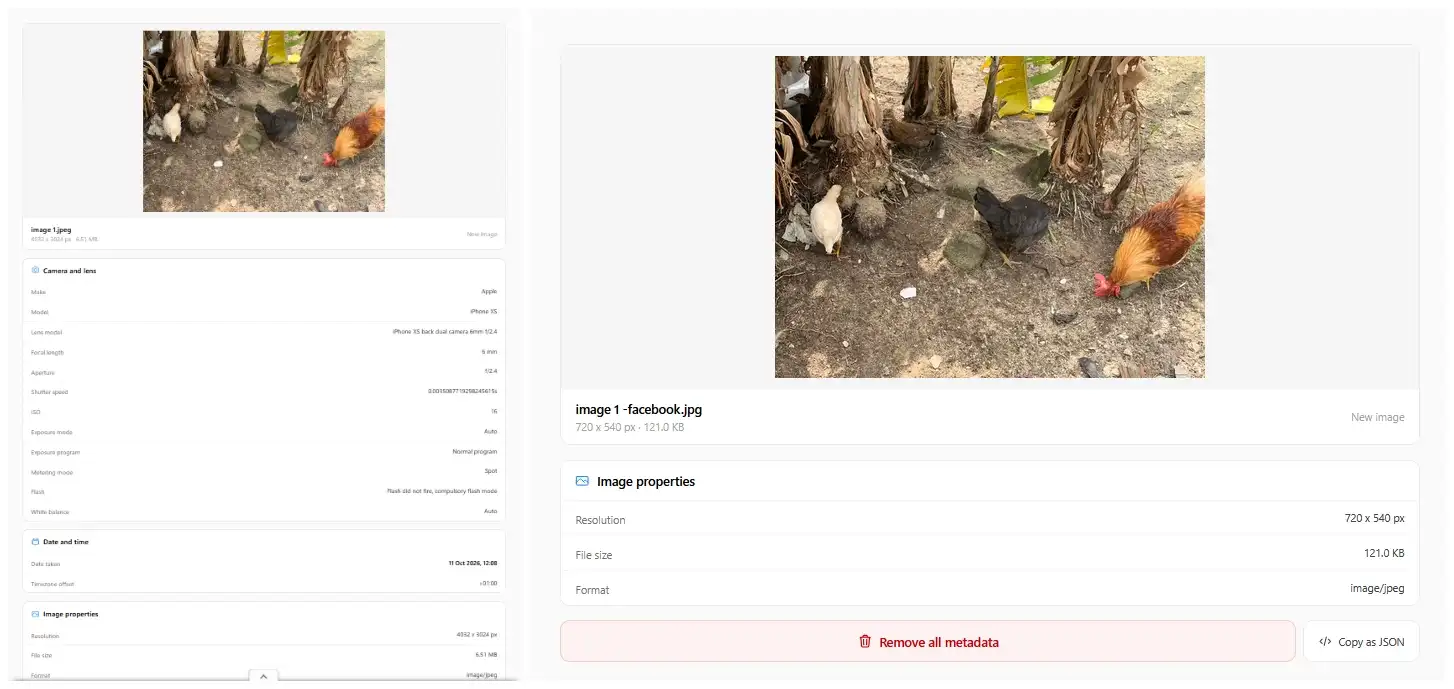
We put the two metadata views into one picture so the difference is easy to see at a glance. If you want to do the same with your own screenshots, the merge images tool joins separate images into a single file, right in your browser.
Why X and Facebook Gave Such Different Results
Facebook's copies were much smaller, but that's partly just a smaller target size: 720 pixels wide against 1200. Per pixel, X also kept more detail on all three photos, as the bits-per-pixel table shows.
X also has published rules that Facebook doesn't. In December 2019, an X engineer announced that JPEGs uploaded through the web would be preserved as encoded, with caveats. The image couldn't carry an EXIF rotation tag, couldn't exceed 4096 pixels in either direction, and had to stay under 5 MB. Our Photo 1 was 6.50 MB, over that line, while Photos 2 and 3 were under it.
Two cautions apply. That announcement is from 2019, and we found no newer one, so treat it as a snapshot rather than current policy. And our 1200 by 900 files are the resized medium copies, so they can't tell us what X stores in its full-size version. To see that, open each photo's full-size view on X, save that file instead, and compare. If it differs from what we measured, we'll update the numbers.
How to Run This Test on Your Own Photos
You don't need special software. Five steps give you the same picture we got.
- Note the original's file size and pixel dimensions before you upload anything.
- Upload the photo, then save the copy the platform serves back to you. On X, open the full-size view first and save that as well, since it can differ from the feed copy.
- Compare dimensions and file size. Divide the new pixel count by the old one to see how much was removed.
- Zoom both files to 100 percent on the same spot. Pick one detailed area, like foliage or text, and one smooth area, like sky or a wall. Compression damage shows up differently in each.
- Check the metadata on both. The image info tool is one way to look.
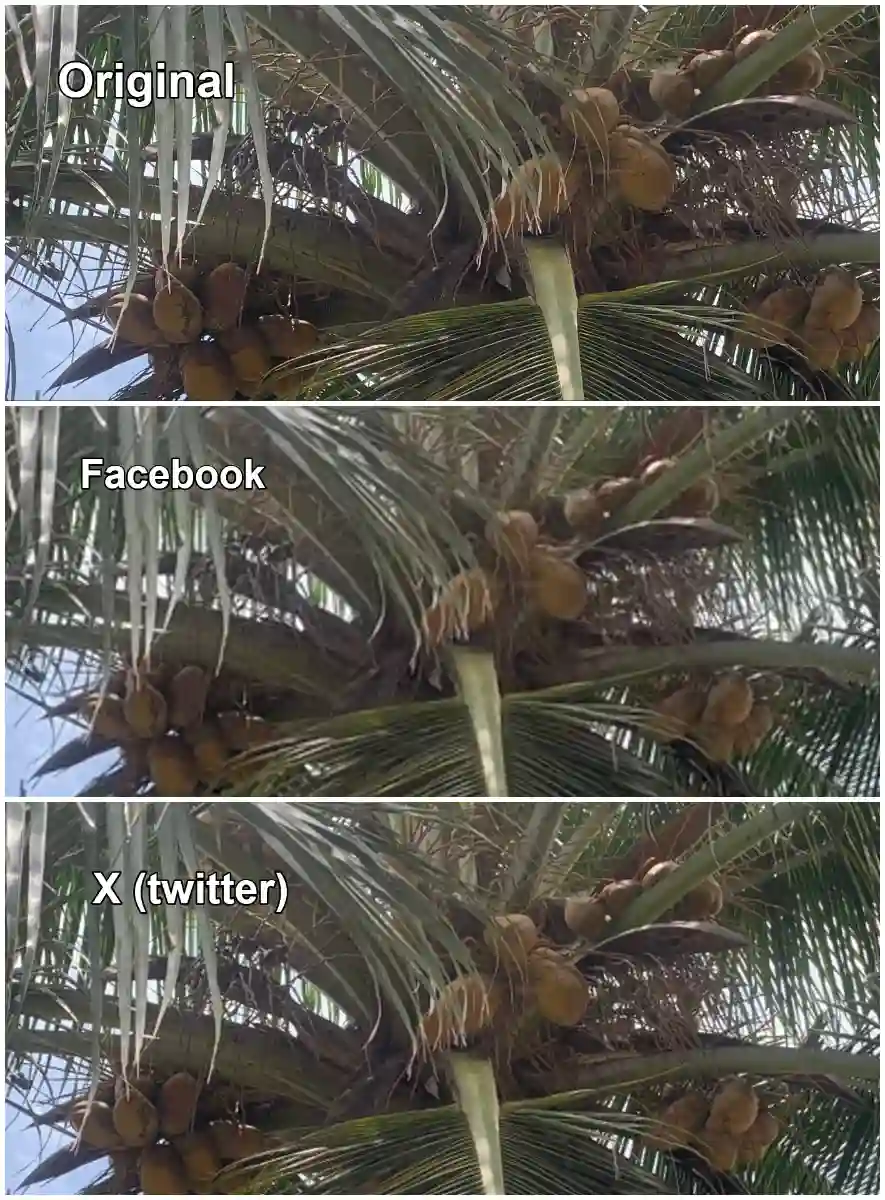
To build a comparison like this, crop the same spot from each file, then line the three crops up with the merge images tool. The add text to image tool is handy for labelling each one as original, Facebook or X, so nobody has to guess which is which.
How to Upload So the Photo Survives Better
You can't switch the platform's processing off, but you can control what it starts with.
Resize the photo yourself first. Photographers have long pointed to 2048 pixels on the long edge as the best-looking size for Facebook, and X's own large size is the same figure. Published tests disagree on how big the gain is, but we found none where an oversized original beat a properly sized export. Uploading a 12 megapixel file just means the platform does the downscale and the compression on its own terms. The resize image tool handles the first step, and the guide on reducing dimensions without losing quality explains why the order of resizing and compressing matters.
Export as a JPEG in sRGB at a high quality setting, and avoid squeezing the file down to a tiny size beforehand. A photo that's already been compressed hard and then gets compressed again by the platform loses more than one that arrives clean. The JPEG compressor lets you compress once, deliberately, if you do need a smaller file.
Stay inside the limits we know about. For X that means 4096 pixels or less on each side and under 5 MB, based on the 2019 note. If your photo has a rotation tag and keeps misbehaving, re-save it so the rotation is baked into the pixels, then check it still looks right.
Finally, keep your originals. The Facebook copy of our Photo 1 holds about 2 percent of the original's bytes. Never use a platform copy as your backup, and never re-upload one expecting the original quality to come back.
If you want per-platform sizes and quality settings rather than the why, how to compress images for social media covers those.
It's Not Only Social Networks
The same thing happens on ordinary websites, just with rules you can change. WordPress, for example, has scaled any upload larger than 2,560 pixels on its longest edge down to that size by default since version 5.3, and it also generates several smaller sizes of each image. The original file stays on the server, but visitors get the scaled copies. If a photo on your own site looks different from what you uploaded, check the site's image settings and any plugin or CDN in front of it before blaming the browser.
Frequently Asked Questions
Do Facebook and X delete my original photo? We can't tell from outside, and neither platform publishes what it keeps. What you can verify is the copy served to you, and that's the one that's been resized and recompressed. Keep your own original either way.
Why is the X copy bigger than the Facebook copy? X served a larger size, 1200 pixels wide against 720, and also kept more bits per pixel on all three of our photos. Different target sizes and different encoder settings both play a part.
Can I upload a photo without any compression at all? Not entirely, as far as we could verify. X said in 2019 that qualifying JPEGs would be preserved in the full-size view, but feed previews are still re-encoded. For Facebook, the realistic goal is to reduce the damage, not avoid it.
Why do my colors look different after uploading? Usually a color profile issue. Phone photos can use a wider color range than sRGB, and a platform that converts or ignores the profile can change how saturated they look. Exporting as sRGB before you upload gives you the most predictable result.
Should I compress a photo before uploading it? Resize it first, then compress lightly if you need to. Compressing hard yourself and letting the platform compress again stacks the loss. If you're targeting a specific file size for a form or portal, that's a different job, and why image uploads keep failing covers it.
Does this happen on my own website too? Often, yes. Many content management systems resize uploads and create smaller copies, and WordPress caps large uploads at 2,560 pixels by default. The difference is that on your own site you can usually change the settings.
Try It Yourself
Before your next upload, resize the photo to a sensible size, compress it once with the JPEG compressor if you need to, and run a before-and-after through the image info tool to see what the platform changed. If you'd rather compare two versions side by side, the compare images tool is built for that. All of these run in your browser, so your photos aren't uploaded to our servers.
Related articles
How to Compress Images for Social Media (Instagram, Facebook, X, LinkedIn)
Every platform recompresses your images the moment you upload. Here are the exact sizes, formats and quality settings for each one.
ReadDoes WhatsApp Remove EXIF Data From Photos? Here's What We Found After Testing
We sent the same photo through WhatsApp two different ways and checked what survived.
ReadHow to Reduce Image Dimensions Without Losing Quality
Downscaling removes data rather than inventing it, so it should not cost quality. Here is why images still end up looking soft.
Read